Organizing Fields in the Asset Table
Set Your Viewing Preferences for Your Self, Your Organization, and Your Guests
Written By El
Last updated 2 months ago
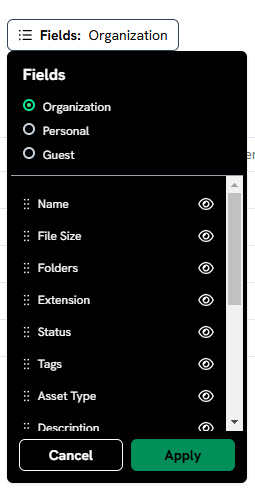
You can customize how your assets are displayed and choose which fields appear in the asset table using the sort button above the table, which opens the field-organization popover.
When you open this up you can toggle between organization personal and guest. The organization settings will be reflected for everyone within your company that is accessing the table. Your personal settings are viewable only for you. The guest settings allow you to set exactly which fields your invited guests will be able to see in the asset table.
You can lock fields so they are not visible by clicking on the eye icon. Hidden fields are listed at the bottom of this modal and can be restored to view by scrolling to the hidden field, and clicking on the grey eye icon.
Use the six dots the left of the field names to select the field and drag it to the order you prefer in your asset table.
Once you are happy with how your asset table is set up, you can save that view.