General FAQs
Questions about the general use of Prodify
Written By El
Last updated 5 months ago
What is Prodify?
Prodify simplifies managing project folders, sharing architectural drawings, and controlling access to product information—all in one convenient platform.
Building product manufacturers (BPMs) grapple with outdated, inaccurate, or duplicated assets stored in different hard-to-find places. This can be addressed with Digital Asset Management (DAM) software. DAM consolidates all your digital assets in one, easily findable place. Anything that is stored digitally and uniquely identifiable can be used by organizations.
Keeping up with a growing number of assets to ensure cohesion, consistency, quality, and accuracy can be daunting for BPMs, particularly those with seasonal product lines and regular product launches and expansions. All building product manufacturers with digital assets, from small to large-sized organizations, should consider using a DAM solution.
During our over 25 years of experience helping manufacturers reach specifiers with CADdetails.com, our team has recognized the need for a robust software solution that efficiently handles the unique challenges BPMs face. We’ve taken action to fill this gap by creating our sister brand and new product, Prodify, the first-ever DAM solution specifically designed to improve the growth potential and internal efficiency of building product manufacturers.
How do I control what someone can do once I share Assets or Folders?
When you invite a new user to your Prodify, you can see their User Role as Admin, Editor, or Viewer.
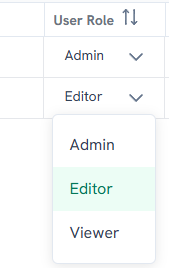
Admin
These accounts have top level permissions.
Administer accounts manage settings for other users in your Company.
Can edit permissions for all content and folders
Access billing and subscription information.
Set default fields for table, gallery, and form views.
The Admin account is for manager-level users administering the account.
Editors
Can edit content.
Organize content into folders.
Add content to Favorites.
Share assets and folders with external parties.
This level of permissions is best suited for Marketing team members.
Viewers
View and download all content
Add favorites.
Share assets and folders.
This permission level is best suited for sales representatives and SDRs and is ideal for users who need to access assets but not manage or organize assets.
Is there a Sandbox environment for Prodify?
No, there is not a currently available sandbox environment for Prodify. If this is something you need, contact [email protected] to discuss.
Can I Publish to Third-Party Platforms?
You can publish using Public Links for your owned channels. You can update content centrally in Prodify and have those updates reflected wherever the link is used. Third-Party Platforms have their own ingestion and publishing requirements, so updates there are not pushed via public links. We are planning to create Integrations that will eventually allow publishing to third-party ecosystems.