Date picker overflows grid and is partially hidden on smaller screens🔵
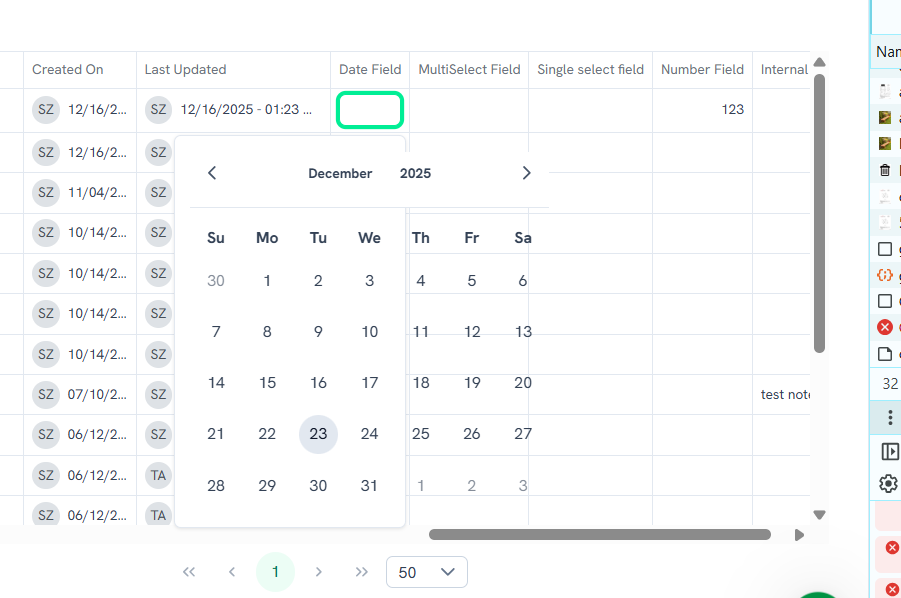
When opening a date picker in the Assets table (custom Date field) on a smaller screen with limited horizontal space, the calendar popup renders outside the visible area of the table
Steps to reproduce:
Open Assets table view
Add custom field with Date type
Click ‘Edit’ button
Click on date cell and resize the screen horizontally
Expected result: The date picker adapts to smaller viewports and remains fully visible within the table
Actual result: Date picker overflows the grid
Please authenticate to join the conversation.
Upvoters
Status
Completed
Board
🐛 Report an Issue
Tags
Medium Priority
+1
Date
9 months ago
Author

Svitlana
Subscribe to post
Get notified by email when there are changes.
Upvoters
Status
Completed
Board
🐛 Report an Issue
Tags
Medium Priority
+1
Date
9 months ago
Author
Svitlana
Subscribe to post
Get notified by email when there are changes.