Application cache login issues🔵
Multiple users (internal for now) are running into an authentication issue where the user data gets cached in local storage and cannot be cleared without manually clearing out the users browser app cache.
This additionally causes a side affect where the user is then directed to the Client Portal login screen.
This also creates a 3rd side affect where after the user logs in through the Client Portal screen they lose Super Admin access and are treated like a normal user that can only access assigned companies
I will begin investigation on this immediately
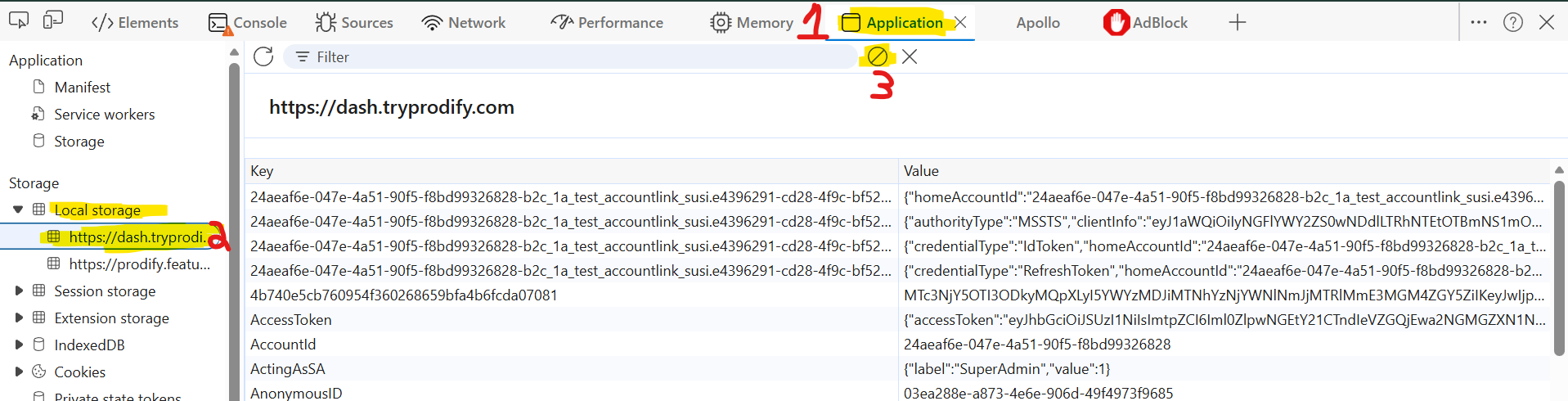
We do have a temporary work around that has a high success rate for fixing this issue:
Login to Prodify through the login screen (this works regardless of client portal vs. normal login)
After you’ve logged in, press f12 (or fn+f12) to bring up the browser console
Look for the application tab and then follow the numbered steps below
Reach out to me (Nicholas) on teams if you need help or this does not work
Please authenticate to join the conversation.
Completed
🐛 Report an Issue
Login/Registration
5 months ago

Nicholas Vail
Subscribe to post
Get notified by email when there are changes.
Completed
🐛 Report an Issue
Login/Registration
5 months ago
Nicholas Vail
Subscribe to post
Get notified by email when there are changes.